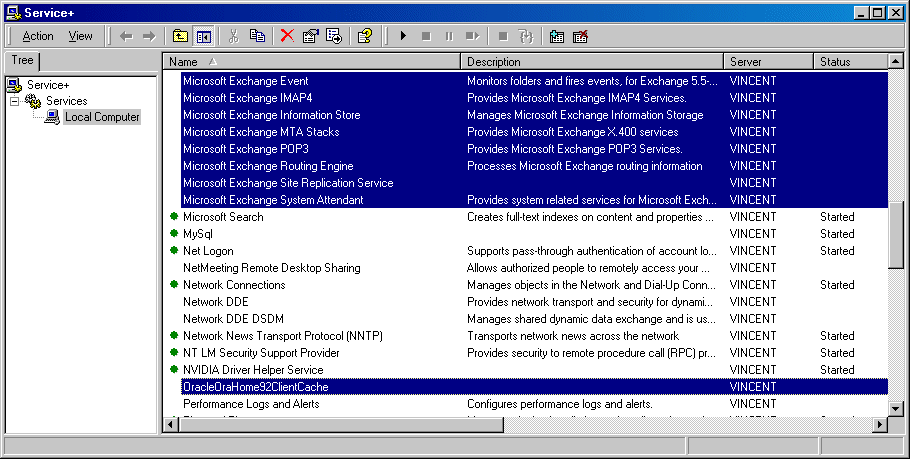
可以同時控制多個伺服器的服務功能,也可即時監視伺服器的服務狀態。
- Service+ Lite
- 軟體版本 : 3.6.48 (Intel)
- 軟體分類 : 3架站工具 (伺服器管理)
- 語言介面 : 英文
- 作業系統 : Windows Server
- 軟體性質 : 免費軟體
- 使用限制 : 請見說明
- 檔案大小 : 666 KB
- 官方網站 : Active+ Software
- 點閱次數 : 19,961下載次數 : 2,183
- 更新時間 : 2002/12/25 下午 03:31:11
軟體簡介
這是一個伺服器的服務功能管理工具,其優點有:1>可同時開啟、停止、重新啟動多項服務功能。2>同時設定多項的服務功能。3>移除服務功能。4>無須重新開機即可終止沒有回應的服務功能。5>即時監控主機各項服務功能的狀態。6>將主機目前所提供的服務功能及設定全部列表,並即時監控。
版本說明
v3.6.48 20-May-2003
Corrected: The service executable path validation was failing when parameters were specified.
Corrected: The computer name field is no longer limited to 15 characters. Therefore it is now possible to enter an ip address or a fully qualified domain name
v3.6.47 19-Dec-2002
Changed: Service+ toolbar buttons are now flat.
Corrected: Garbage displayed when editing access denied service properties.
Corrected: Crash when entering a service description longer then 259 characters.
Corrected: Service list was not properly refreshed when applying changes on service configuration.
Corrected: Toolbar buttons were not updated when applying changes on service configuration.
Corrected: Service dependents list was never updated in the list view.
Corrected: When service dependencies were modified, group dependencies were lost.
Corrected: Service Program existence was not verified when changing the executable path.
說明介紹
系統需求: *Windows NT 4.0 or Windows 2000 *500 KB of hard disk space *Versions are available both for Intel and Alpha.
版本說明
x64/x86_64 : 64 位元x32/x86/i386 : 32 位元amd64 : Intel/AMD 64 位元arm64/aarch64 : arm 64 位元安裝版 : 軟體需經過安裝程序才可執行免安裝版/可攜式版 : 軟體不需安裝即可執行
圖片參考
圖片來源 : www.activeplus.com
網編推薦.

多語 MaxFocus: 連結預覽和AI助手 0.5.8 for Chrome Extensions
MaxFocus 讓您無需離開目前頁面即可產生詳細的連結預覽,從而提升您的 Chrome 瀏覽體驗。此功能可幫助您避免開啟過多標籤頁造成的混亂,從而節省寶貴的系統資源。
在功能上,MaxFocus 提供了閱讀模式,可以將網頁內容呈現在一個乾淨、無干擾的環境中,讓用戶能夠更專心地進行閱讀。同時,視訊模式為用戶提供了一個只有視訊內容,沒有任何多餘元素的觀看體驗。這些模式都是可以根據用戶的個人偏好進行自定義的,包括預覽視窗的大小、持續時間等。
MaxFocus 的 AI 功能是它的另一大特色。透過 AI 輔助,用戶可以直接在頁面上獲得對應內容的摘要或答案,這對於快速擷取資料要點尤其有用。此外,MaxFocus 還支援多種主流瀏覽器,包括 Chrome、Firefox、Edge、Vivaldi 和 Brave,確保了廣泛的相容性和用戶的選擇自由。
在安全性和隱私保護方面,MaxFocus 做出了明確的承諾。它不會追蹤用戶的瀏覽歷史,也不會存儲任何個人資料。此外,它還能夠阻擋網站追蹤器,保護用戶的線上足跡不被第三方追蹤。
網編推薦.
多語 MaxFocus: 連結預覽和AI助手 0.5.8 for Chrome Extensions
MaxFocus 讓您無需離開目前頁面即可產生詳細的連結預覽,從而提升您的 Chrome 瀏覽體驗。此功能可幫助您避免開啟過多標籤頁造成的混亂,從而節省寶貴的系統資源。
在功能上,MaxFocus 提供了閱讀模式,可以將網頁內容呈現在一個乾淨、無干擾的環境中,讓用戶能夠更專心地進行閱讀。同時,視訊模式為用戶提供了一個只有視訊內容,沒有任何多餘元素的觀看體驗。這些模式都是可以根據用戶的個人偏好進行自定義的,包括預覽視窗的大小、持續時間等。
MaxFocus 的 AI 功能是它的另一大特色。透過 AI 輔助,用戶可以直接在頁面上獲得對應內容的摘要或答案,這對於快速擷取資料要點尤其有用。此外,MaxFocus 還支援多種主流瀏覽器,包括 Chrome、Firefox、Edge、Vivaldi 和 Brave,確保了廣泛的相容性和用戶的選擇自由。
在安全性和隱私保護方面,MaxFocus 做出了明確的承諾。它不會追蹤用戶的瀏覽歷史,也不會存儲任何個人資料。此外,它還能夠阻擋網站追蹤器,保護用戶的線上足跡不被第三方追蹤。